Imagine this: Your company is growing, new locations are being added, perhaps even new brands – and with each growth step, a new website emerges. Soon you're managing five, ten, or more separate WordPress installations. Each update, each security measure, and each feature extension must be implemented multiple times. The administrative overhead increases exponentially, while the consistency of your digital presence suffers.
This is exactly where WordPress Multisite comes in – a solution that promises to drastically reduce this administrative overhead by managing multiple websites through a single installation. But is this solution really the panacea for growing web landscapes, or does a technical straitjacket hide behind the alluring efficiency that creates more problems in the long run than it solves? In practice, it becomes clear: The decision for or against Multisite is not purely a technical question, but a strategic decision with far-reaching consequences for your company's digital future viability. This article critically examines the structure, opportunities, and limitations of WordPress Multisite and provides decision-makers with concrete guidance on when this architecture makes sense – and when alternative approaches offer more flexibility.
What is a WordPress Multisite?
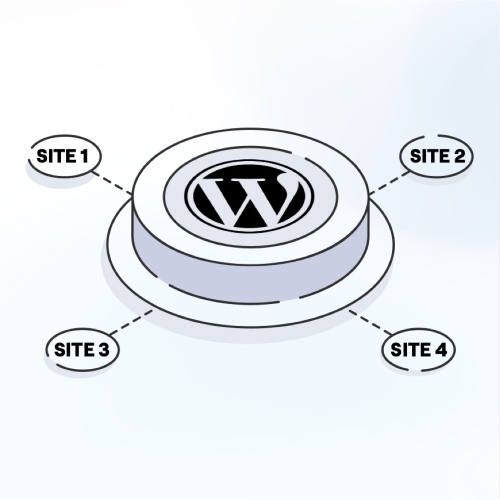
WordPress Multisite is a native functionality of the WordPress core that makes it possible to manage multiple websites through a single WordPress installation. This feature was integrated into the core in 2010 with WordPress 3.0, after previously existing as a separate project under the name "WordPress MU" (Multi-User).
In a professional context, WordPress Multisite typically finds application in:
- Corporate groups with multiple brands or locations
- Educational institutions with different faculties or departments
- Franchise companies with a uniform brand presence
- Public institutions with multiple departments or regional presences
- Publishers with various thematic portals
The Multisite functionality makes it possible to manage all these websites centrally, while they appear to visitors as independent web presences.
How does a Multisite work technically?
Architecture of a WordPress Multisite
A WordPress Multisite is based on a central WordPress installation that serves as the foundation for all subsites. These share:
- A common WordPress core
- A common file system for themes and plugins
- A central user management system
- A common database, but with separate tables for each subsite
Each website within the Multisite structure receives its own database tables for its specific content such as posts, pages, and metadata. The prefix of these tables contains a unique identifier for each subsite, which ensures data separation within the common database.
URL Structures in Multisite
WordPress Multisite supports two basic URL structures:
- Subdomains: Each website receives its own subdomain (e.g.,
brand1.company.com,brand2.company.com) - Subdirectories: All websites share a domain, but are stored in different directories (e.g.,
company.com/brand1,company.com/brand2)
The choice between these structures should be made early, as a subsequent change is technically complex and can have SEO implications.
Differences: Multisite vs. Single Instances
The decision between a Multisite structure and multiple single instances is fundamental for the long-term management of web presences.
Multisite
- A central WordPress instance for all websites
- Common user management with central super administrators
- Common plugin and theme management with the ability to activate plugins network-wide or only for specific subsites
- Central maintenance, updates & security: An update of the WordPress core or critical plugins must only be performed once
Single Instances with Management Tools
Alternatively, separate WordPress installations can be managed with tools like ManageWP or WP Engine. These offer:
- Full autonomy per website with separate databases and file systems
- Individual server configurations and hosting options
- More flexibility in the choice of plugins, themes, and technical solutions
- More complex but more flexible maintenance with higher potential costs
| Aspect | WordPress Multisite | Single Instances (e.g., ManageWP) |
|---|---|---|
| User Management | Central for all sites | Individual per site |
| Maintenance & Updates | One-time for all sites | Individual, but centrally controllable |
| Flexibility per Website | Limited by common base | Completely independent |
| Resource Usage | Shared resources | Dedicated resources per site |
| Separation for Sale | Technically complex | Unproblematic |
| Deployment Strategy | Common for all sites | Individually adaptable |
| Performance Isolation | Limited (mutual influence) | Complete (separate systems) |
Advantages of the Multisite Structure
The Multisite architecture offers numerous advantages, especially for organizations with multiple similar websites:
Efficient Management and Maintenance
- Central maintenance: Updates for WordPress core, themes, and plugins must only be performed once
- Reduced administrative overhead: A central interface for all websites
- Consistent security: Security measures are implemented uniformly for all websites
Flexible User and Rights Management
- Role-based management: Users can be specifically assigned to individual or multiple sites
- Central super administrators: Comprehensive control over all websites
- Local administrators: Limited rights for individual subsites
Technical and Design Consistency
- Global and selective plugin activation: Some plugins can be activated network-wide, others only for specific subsites
- Consistent appearance: Through parent theme structures, a uniform design with individual adjustments per subsite can be realized
- Shared media library: Optionally, media can be shared between websites
Ideal Use Cases
WordPress Multisite is particularly suitable for:
- Franchise companies with a uniform brand presence
- Corporate groups with multiple brands or locations
- City or state websites with common CI/CD guidelines
- Educational institutions with different faculties or departments
- Media companies with thematically related portals
Limitations & Risks: When WordPress Multisite Becomes a Growth Barrier
As powerful as WordPress Multisite is – not every organization benefits from it. Especially with highly heterogeneous requirements, specific security requirements, or ambitious expansion goals, the central structure can become a challenge. In our consulting practice, we see time and again: What initially looks like efficiency can prove to be a limiting factor in the medium term.
Technical Limitations
A Multisite shares a common technical foundation. This has advantages – but also brings the following disadvantages:
- No individual WordPress version per subsite: All websites run on the same version. Individual upgrades or downgrades are not possible.
- Multilingual websites with hreflang linking: For international presences with cross-language linking (e.g., via hreflang attributes), a Multisite architecture is only conditionally suitable. The use of specialized plugins like Polylang or WPML within a single instance is usually significantly more efficient, as content can be managed centrally and languages can be cleanly linked with each other. Linking multilingual content across multiple subsites is technically possible, but requires significantly higher development effort, as each language unit resides in separate database schemas and the maintenance of hreflang attributes must be done manually or via custom solutions.
- Shared media library poses licensing risks: In a Multisite, all subsites share the same upload folder by default. This means images and media can be accessed across sites – even by users who have no connection to the original project. This can lead to legal problems, particularly with licensed images or client-specific assets. These access possibilities can be restricted via server-side rules or plugin solutions, but require conscious and technically clean configuration. For projects with client-separated media responsibility, separate media management in single instances is often the safer choice.
- Central plugin and theme infrastructure: What makes sense for one subsite can be unnecessary or even disruptive for another.
- Mutual performance relationship: Resource-intensive processes on one website potentially affect the entire network – performance isolation is lacking.
Practical example: A subproject requires a special plugin that is not compatible with the rest of the network? This often leads to technical friction or workarounds that are difficult to maintain in the long run.
Operational Challenges
- Backup & Restore: While there are Multisite-capable backup tools, a targeted restore of a single site is significantly more complex than with single instances.
- Deployment & Testing: Changes in themes or plugins affect the entire network. A supposedly small error can affect multiple websites at once – testing must be carefully orchestrated.
- Onboarding & Rights Management: While roles can be defined, the administrative overhead with many subsites and different teams can increase.
Strategic Risks & Organizational Hurdles
- Separation of individual websites (e.g., for sale, spin-off) is technically complex and error-prone. Data migration, URL structures, and user rights must be manually reconstructed.
- Different hosting requirements for individual projects cannot be flexibly accommodated. For example, if a project needs to process GDPR-relevant data with special security zones, the central system reaches its limits.
- CI/CD and rebranding processes are complicated: Changes to the design system or content architecture have global effects – even when only one subsite is affected.
When Multisite is Unsuitable – Typical Scenarios
| Use Case | Recommendation |
|---|---|
| Highly different target groups, designs, or functions | Better: Single instances |
| Separate deployment cycles or developer teams | Better: Individual instances with version control |
| Future organizational separation (sale, exit, spin-off) | Better: Single instances for easy migration |
| High requirements for performance isolation | Better: Container-based architecture or dedicated servers per project |
| Different security zones (e.g., healthcare, HR, finance) | Better: Separate installations with differentiated hosting concept |
Alternatives to Multisite
For organizations that want to leverage the benefits of central management without accepting the limitations of a Multisite structure, there are various alternatives:
Single Instances with Central Management
Tools like ManageWP, MainWP, or InfiniteWP enable central management of multiple independent WordPress installations:
- Updates for WordPress core, themes, and plugins can be rolled out centrally
- Backups can be managed and executed centrally
- Security scans can be performed for all websites
Hosting providers like WP Engine offer special solutions for managing multiple WordPress installations that provide similar benefits to a Multisite, but with greater flexibility.
Modern Deployment Strategies
For technically savvy teams, advanced deployment strategies are available:
- Deployment from a Git repository with multiple configurations: All websites share the same code base but are individually configured and deployed on separate instances
- Container-based solutions: Each website runs in its own container, improving isolation and scalability
- Headless CMS approaches: A central CMS manages the content, while different frontends present this content
These approaches require more technical know-how and DevOps capacity, but offer maximum flexibility with simultaneous central management.
Decision Guide: Multisite or Not?
The decision for or against WordPress Multisite should be based on a thorough analysis of specific requirements. The following questions can help in decision-making:
Questions for Self-Reflection for Projects
Similarity of Websites:
- Are all websites similar in content and technology?
- Do all websites require similar plugins and functionalities?
Administrative Overhead:
- Is there a high need for central maintenance?
- How important is unified user management?
Long-term Strategy:
- Is the future independence of individual sites possibly desired?
- How likely are sales or spin-offs of individual websites?
Design and Brand Management:
- Are there uniform CI/CD guidelines for all websites?
- How much do the designs of individual websites differ?
Scaling and Growth:
- What is the project volume and expected scaling?
- How many websites should be managed initially and in the long term?
Honest answers to these questions help make the right architectural decision.
Conclusion: Strategy Beats Technology
The decision for or against WordPress Multisite is not a purely technical question, but has far-reaching strategic implications. A Multisite structure can bring significant efficiency gains in managing multiple similar websites, but limits flexibility and complicates possible future separations.
The key to successful implementation lies in the long-term scaling and exit strategy. Before making the decision, not only current requirements but also future developments should be considered.
For complex web landscapes, well-founded consultation by experienced technical partners such as mindtwo is recommended to develop a future-proof architecture that meets both current requirements and leaves room for future growth.
The right decision between Multisite and single instances can save significant costs in the long run and ensure the company's flexibility in the digital world.
Your WordPress Multisite Strategy
Do you need support in developing an efficient and future-proof Multisite strategy for your web landscape? As experienced WordPress experts, we support you in the conception, implementation, and maintenance of your WordPress projects.
👉 Submit project inquiry now and benefit from our expertise.