In software development, we frequently encounter version numbers consisting of three numbers, such as 1.2.3. This structure is called Semantic Versioning or SemVer. But what does this mean exactly, and why is it so crucial for developers to understand and follow SemVer? In this blog article, I'll explain what SemVer is, how it works, and why it's important, especially when you're working with dependencies in software projects.
What is SemVer?
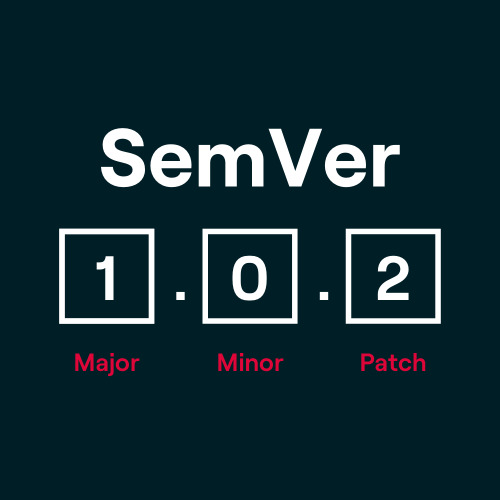
Semantic Versioning is a standard for assigning version numbers that was developed to clearly and understandably represent what changes have been made in a new version of a project. The standard divides the version number into three parts: Major, Minor, and Patch.
The structure looks like this:
MAJOR.MINOR.PATCH
- Major Version (
MAJOR): This number is incremented when there are breaking changes – changes that are not backward compatible and may break existing functionality. - Minor Version (
MINOR): This number is incremented when new features are added that are backward compatible. - Patch Version (
PATCH): This number is incremented for bug fixes or other small, backward compatible changes.
An example: If a project's version is increased from 2.4.3 to 3.0.0, it means that significant changes have been made that may make the application incompatible with earlier versions.
A Practical Example: Vue.js, Nuxt.js, and Laravel
In modern web development, we rely on a variety of frameworks and libraries that make our lives as developers considerably easier. Projects like Vue.js, Nuxt.js, or Laravel depend on a multitude of dependencies and components that are regularly updated. In the following examples, we'll look at how Semantic Versioning (SemVer) works in these frameworks and what impact updates can have on your project.
Vue.js and Nuxt.js: A Dynamic Duo
Vue.js: Breaking Changes and Major Updates
Vue.js, a popular JavaScript framework, follows the SemVer principle. Let's look at Vue.js's version number, for example 3.2.45:
- Major Version (3): Vue.js made some fundamental changes in major version
3.x.xcompared to Vue.js2.x.x. This includes the introduction of the Composition API and the removal or modification of certain features from version 2. If you upgrade from Vue 2 to Vue 3, there's no guarantee that your existing code will continue to work. Such a Major Update may require extensive adjustments in your application. - Minor Version (2): This number is incremented when new features are added, such as improved support tools, without changing existing features. An update from
3.1.0to3.2.0could, for example, add new functionality to the Reactivity API without affecting existing implementations. - Patch Version (45): Bug fixes or small adjustments are made here. An update from
3.2.44to3.2.45, for example, only fixes small errors but has no impact on the functionality of your existing application.
Nuxt.js: Upgrade with Caution
Nuxt.js, which builds on Vue.js, provides a good example of the challenges of dependencies. Since it's a meta-framework, it relies on various sub-components and modules. An update to the Nuxt version can affect both Vue.js and various Nuxt modules (such as Axios integration, Auth modules, etc.).
A real-world example:
When Nuxt.js switched from version 2.x.x to Nuxt 3, there were major changes because it was completely converted to the new Vue.js 3 architecture. This affected not only the framework itself but also many Nuxt-specific modules and plugins. Developers had to adjust their projects accordingly because this major release contained Breaking Changes that were not backward compatible. Sub-components like Nuxt Content, Nuxt Image, or Nuxt Auth also had to be adapted and often brought to a new major version.
Important Note: With a major update like this, a thorough review and adjustment of the entire project should always be performed. Especially with extensive dependencies and plugins, there's a risk of incompatibilities after an upgrade.
Laravel: An Entire Ecosystem
Laravel, the leading PHP framework, has an entire ecosystem of sub-components that must be considered during an update. In a typical Laravel project, many modules like Laravel Sanctum, Laravel Telescope, or Laravel Nova are integrated.
Laravel 9: A Major Release with Many Adjustments
Let's say you're using Laravel 8 and want to upgrade to Laravel 9. Here, for example, the minimum PHP version was set to 8.0 and some internally used libraries and functions were completely redesigned. This means:
- Laravel Sanctum, which is used as an authentication system for Single Page Applications (SPA), had to be adapted to a new version.
- Laravel Nova, the admin panel for Laravel, also released a major update to remain compatible with Laravel 9.
During the major update from Laravel 8 to 9, it can happen that older packages are no longer compatible. This particularly affects sub-components like Laravel Cashier, which is used for Stripe integration. The major versions of these packages must be carefully checked to ensure that all modules continue to function.
How Do I Avoid Unpleasant Surprises During Updates?
When working with frameworks like Vue.js, Nuxt.js, or Laravel, there are a few best practices to ensure you use SemVer correctly and avoid potential problems:
- Read the Release Notes Carefully: Before performing a major, minor, or patch update, you should thoroughly read the official Release Notes. All breaking changes, new features, and bug fixes are documented precisely here.
- Use a Staging Environment: Never update your project directly in the production environment. Use a staging environment to check whether everything works as expected after the update.
- Dependency Check: When you perform a major update, always check all sub-components and dependencies as well. Use tools like
composer outdated(for Laravel) ornpm outdated(for Vue.js/Nuxt.js) to see if your dependencies also need to be updated. - Version Constraints: In package managers like NPM or Composer, you can specify exact version requirements. For example, if you want to ensure that no major version of a package is installed, you can specify versions like
^2.0.0, which means only minor and patch versions will be installed.
Whether you're working with Vue.js, Nuxt.js, or Laravel – handling versions and updates should always be done with care. SemVer gives you a clear structure for how you can evaluate changes. But in the end, it's up to you to ensure that your project continues to run stably after an update. Always pay attention to dependencies and sub-components, because in a complex ecosystem like Laravel's or Nuxt.js's, changes can have far-reaching effects.
Why is SemVer So Important?
Proper versioning is crucial for several reasons:
- Clarity and Communication: Developers and users know immediately whether a new version involves minor improvements, new features, or potentially destructive changes.
- Ensure Compatibility: By adhering to SemVer, you can ensure that new versions of software don't cause unforeseen problems as long as no major version is changed.
- Manage Dependencies: In many projects, there are dependencies on other libraries or modules. If these libraries manage their versions correctly, you can ensure that updates don't break any of your functions as long as you stick to minor and patch updates.
When Does SemVer Not Apply?
However, there are also projects that don't strictly adhere to SemVer. A prominent example is TypeScript, which follows its own versioning approach. With TypeScript, for example, the major version is incremented when the minor version exceeds a certain threshold, even if there are no breaking changes. This means you can switch from version 4 to 5 without necessarily encountering incompatibilities.
Versions before 1.0.0 are also often a special case. Before this version, there's no guarantee of backward compatibility, and breaking changes can occur with every update.
Frequently Asked Questions (FAQ) About Semantic Versioning
How Should I Handle Versions in the Initial Phase (0.y.z)?
In the development phase before version 1.0.0, there are no fixed rules for backward compatibility. A simple approach is to start the first version as 0.1.0 and then increment the Minor Version for each new release. This gives you flexibility to make changes quickly without immediately releasing a major version.
When Should I Release Version 1.0.0?
When your software is stable and already being used in production environments, you should probably switch to 1.0.0. Especially when users rely on your API and you're thinking about backward compatibility, version 1.0.0 signals stability and reliability.
Does SemVer Slow Down Development?
Not at all! Especially in Major Version 0 (0.y.z), rapid iteration is explicitly allowed and even desired. If you're changing your API daily, you should remain in version 0, or work on a separate development branch to prepare a clean 1.0.0.
Won't I Quickly End Up at Version 42.0.0 if Every Incompatible Change Requires a Major Version?
That depends on how responsibly you plan your changes. Breaking Changes should not be introduced lightly. The more dependencies your software has, the greater the effort for your users to migrate to a new version. This requires planning and weighing the cost-benefit ratio of every major change.
What Do I Do if I Accidentally Released an Incompatible Change in a Minor Version?
As soon as you realize that you've introduced a Breaking Change in a minor version, you should fix the problem immediately and release a new minor version that restores backward compatibility. It's important that you never retroactively change already published versions. Document the error and inform your users so they can avoid the faulty version.
Can I Update My Dependencies Without Changing the Public API?
Yes, as long as your software's public API doesn't change, these changes are considered compatible. Whether it's a patch or minor version depends on whether the update introduces a new feature or merely fixes errors. Typically, an update that adds new functionality requires incrementing the minor version.
How Do I Handle the Deprecation of Features?
Removing deprecated features is a normal part of software development. However, you should do two things:
- Document the deprecated feature clearly so your users know what has changed.
- Release a new Minor Version that contains the deprecation. Before you completely remove the feature, at least one version with a notice of the upcoming removal should be published to give users time to adapt.
Is There a Maximum Length for Version Numbers?
No, there's no formal limit on the length of a version number in SemVer. However, the principle of reasonable use applies. A version string with 255 characters is certainly excessive. Additionally, certain systems may have their own restrictions on the length of version numbers.
Conclusion: Planning is Everything – Testing Even More So!
Even though SemVer is a valuable guideline for version management, one rule remains unshakable: Testing is indispensable. Whether you're updating a minor or patch version, you should always ensure that your application continues to function as expected after the update. Especially in projects with many dependencies, a careless update can quickly lead to unexpected problems.
In practice, this means: Trust the version schema's specifications, but don't rely on them blindly. Every update, no matter how small, should be thoroughly tested to avoid unpleasant surprises and ensure the stability of your application.
If you need support with the planning and development of your next project or are looking for an internet agency to help you with implementation, check out our project inquiry page. We at mindtwo offer you customized solutions and accompany you on the path to a successful digital strategy.
Further information about Semantic Versioning can be found on the official website semver.org.